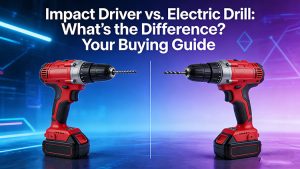
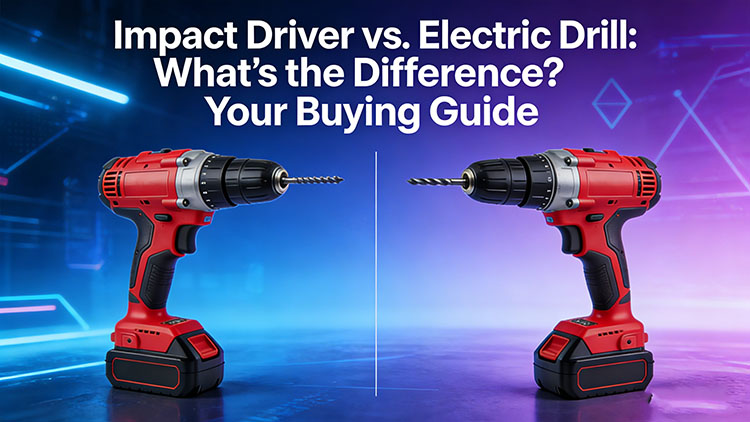
Impact drivers and electric drills are the most commonly used for home, DIY crafts, and routine repairs.Many people may think anything can tighten a screw is the same, but this wrong thought will make damage with tools and ineffectively. In this passage, you will see the evident differences between this two tools and help you find the right solution for your needs.
Note: When we talk about drills in this article, we’re mostly talking about cordless drills (Mxtovel MT-CD20MBL)!
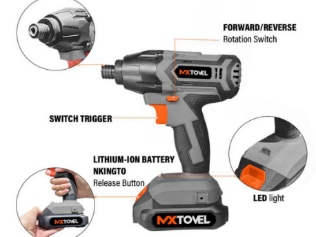
What is an Impact Driver?
An impact driver fastens or removes screws and bolts using an impact mechanism. Simply put, it generates high-frequency axial impacts that convert to powerful rotational force. Think of it like a hammer hitting the end of a wrench attached to a screwdriver which except this happens thousands of times per minute, delivering concentrated power to break through resistance.
Pros
- Superior Torque:
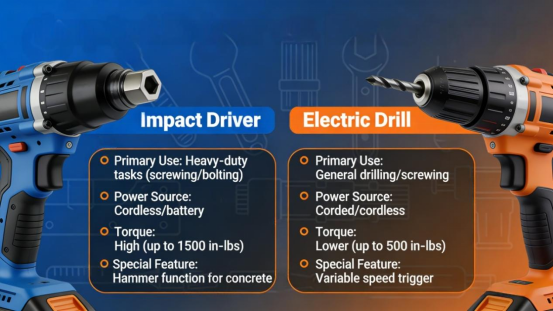
Impact drivers deliver significantly higher torque (200-500N·m) than drills (50-150N·m). This makes them perfect for driving large fasteners like lag screws, decking screws, or construction expansion bolts—tasks that would strain a regular drill.
- Less Kickback:
Unlike drills, which produce continuous rotational force, impact drivers deliver power in short pulses. If it gets stuck, it only moves slightly and stops momentarily, reducing sudden reverse kickback. This is safer than drills, which can jerk violently backward if a bit or screw gets stuck.
- Compact and Lightweight:
At the same power level, impact drivers are smaller and lighter than drills. They’re comfortable to hold for long periods, and their compact size works well in narrow spaces (like inside cabinets) or for high-altitude work.
Cons
- Limited Speed Control:
Most impact drivers have little to no speed adjustment. Some high-end models (like the Ronix 8906) offer 3-speed settings, but their speed control is far inferior to drills. This limits their versatility for delicate tasks.
- Poor for Drilling:
While you can drill with impact-rated bits, impact drivers aren’t designed for this. Without precise speed control, drilling accurate holes is hard, especially in fragile materials like glass, tile, or thin metal. The impact can shift the bit, creating uneven holes or damaging the material.
- Limited Bit Compatibility:
They only work with hex-shank bits, no round or triangular-shank accessories. This narrows their use compared to drills.
Loud Vibration: High-frequency impacts produce more vibration and noise than drills, which can cause hand fatigue during extended use.
What is a Drill?
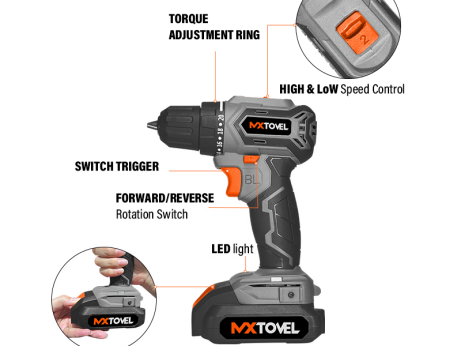
A drill is the most popular power tool. It works by generating constant rotational force, which is perfect for drilling holes in nearly any material. It can also fasten most types of screws, thanks to adjustable torque and speed settings.
One key contrast between drills and impact drivers: drills have higher rotational speed , while impact drivers have higher torque. This makes each tool better suited for specific tasks.
Note: As mentioned earlier, we’re focusing on cordless drills here. Corded drills often lack features like gear selectors and clutches, which are essential for the precision and versatility we’ll discuss.
Pros
- Drills All Materials: The constant rotational force and adjustable speed make drills ideal for drilling precise holes in wood, plastic, metal, tile, and concrete. You can tweak speed and torque for different materials—e.g., slower speed for metal, faster for wood.
- Precise Speed and Torque Control:
Drills have a gearbox selector and clutch, letting you adjust speed and torque for any task. Low torque/speed settings prevent stripping small screws, while high settings boost drilling efficiency.
- Better for Small Screws:
With the clutch set to low torque, drills safely drive small, delicate screws (like those for electronics or cabinet hardware) without overdriving or stripping them.
Cons
- Less Torque:
Drills have far lower torque than impact drivers. They struggle with large, stubborn fasteners and often can’t break through high resistance.
- Slow Bit Changes:
Three-jaw chucks require manual tightening to change bits, which is slower than impact drivers’ quick-release system—frustrating for tasks that need frequent bit swaps.
- Bulky for Narrow Spaces:
Hammer drills or high-power models are heavier and bulkier than impact drivers. They’re less maneuverable in tight spots like cabinet interiors or ceiling corners.
When to Use an Impact Driver vs. Drill
Both tools are essential, but knowing when to use each will save you time and prevent damage to work pieces or tools. If you’re deciding which to buy first, prioritize the one that fits your most common tasks—though having both is ideal for full versatility.
Use a Drill If…
- You Need to Drill Holes: Drills are the best choice for drilling, especially precise holes. Their constant rotation and speed control work for all materials, from wood to metal.
- Drilling Fragile Materials: Always use a drill for glass, tile, thin metal, or other fragile materials. Impact drivers’ pulsed force can crack or damage these surfaces.
- Working with Small/Delicate Screws: Use a drill’s low-torque setting to drive small screws without stripping them.
Use an Impact Driver If…
- Driving Large Fasteners: Impact drivers excel at lag screws, decking screws, expansion bolts, or car tire bolts, any task that needs high torque.
- Mass Assembly: If you’re fastening hundreds of screws like carpentry framing or furniture building, the quick bit changes and high speed will boost efficiency.
- Working in Narrow Spaces: Their compact, lightweight design makes them easier to handle in tight spots where a drill won’t fit.